
DDM Archy Data Schema Management
DDM Archy is a data architecture management product based on DDM modeling capabilities for business domains, business objects, logical entities, physical models, application domains, and application systems. Enterprise-class architectural assets are controlled in Archy, detailed model design is still completed by DDM Client, and model storage and approval are undertaken by the model library.
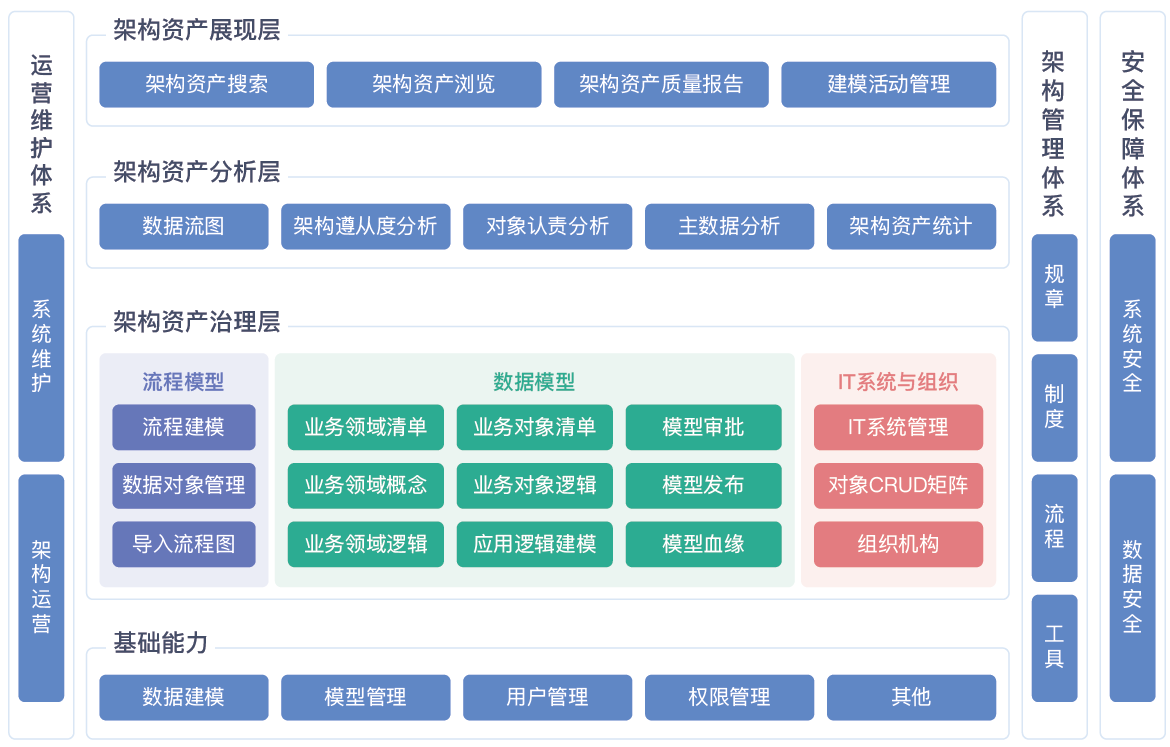
The left menu of the main interface of the product is shown in the figure. The data architecture view, data model management and business process management are the three main work areas. Each page of this manual corresponds to the menu items.
Main Duties and Responsibilities
| Goals | How-to Guides |
|---|---|
| Preparing Catalogs, Roles, and Modeling First Architecture | Getting Started with Archy |
| New Subject Domain Group, Subject Domain, Business Object | Manage Schema Assets |
| View Business Object Entities, Properties and Knowledge Graph | Manage Business Objects and Entities |
| New App Domain, App System and Bind Model | Manage App Domains and App Systems |
| Maintain CRUD-Master Replica Relationship | Maintain CRUD Relationship |
| View Data Distribution and Data Flow Transition View | Use Schema View |
| Connecting Business Objects, Logical Models, and Physical Models | Through Data Models |
| Publish, Retire, Delete and Track Changes | Manage Architecture Asset Lifecycle |
| Batch Import/Export and Sync with External Tools | Import/Export Schema Assets |
Architectural Scope
| Responsibilities | Assignee |
|---|---|
| Subject Domain Grouping, Subject Domains, Business Objects, Application Domains, Controlled and Publishing Approvals for Application Systems | Archy |
| Design of logical and physical models, maintenance of field CRUD relationships and relationships between models | DDM Client, see Inheritance and Transformation |
| Model Library Storage, Versioning, Branching & Approval Flow | Model Library Server, see Model Approval |
Business objects and application systems are controlled in Archy; logical and physical models are created and saved to the model library via the DDM Client, and then relationships are established with the architectural assets. See Creating Branches for branch conventions for team modeling.
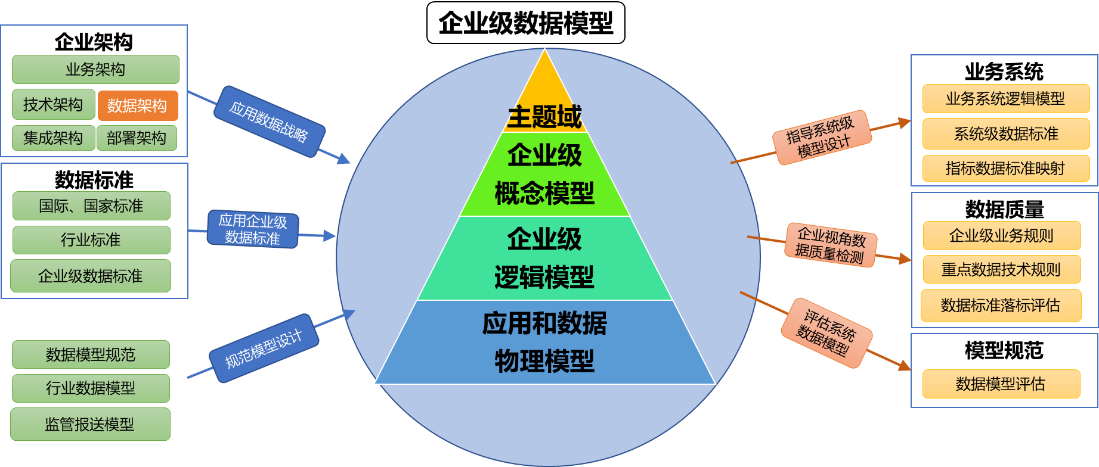
Illustrates the location of the conceptual, logical, and physical layers in the enterprise-level data model. Archy is responsible for running these three layers through the application domain and application system on the application side.
Core Ability
- Hierarchical construction of business architecture assets by subject domain, subject domain, business object, entity, attribute.
- Manage the physical model of the application domain, application system, and its bindings, and view the tertiary relationship on the application side.
- Generate data distribution views and data flow transition views based on CRUD and master replica relationships.
- Control the architectural asset lifecycle by publishing approvals, deprecations, deletions, and changes to history.
- Support Excel bulk import and export, and synchronize with business modeling tools and data asset catalogs.