
Custom properties
Custom attributes are used to maintain extended attributes beyond the native attributes of the product on various types of objects in the model, such as the update frequency and update cycle in the bin scenario. There are two sources of attributes: public attributes that are uniformly issued by the server, and attributes that are individually maintained within the current model. This page describes how to get and load properties, assign values, and verify boundaries for required properties.
Download and load public custom properties
- Select Custom Properties under the Model menu on the top toolbar.
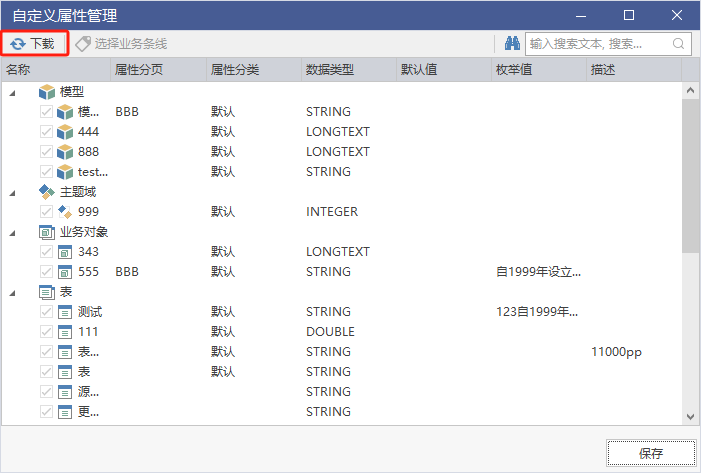
- Click Download to get the latest public custom properties on the model repository server; when there are many public properties, they can be filtered by business lines.
- In the Model tree, select the model you want to load, and right-click and select Load UDP.
- Open the Custom Properties menu in the object editor and confirm that the property appears.

The figure shows the custom property download interface. Note that the download range can be filtered by business lines.
The diagram shows the entrance to "load UDP" on the model in the model tree, and the focus of the diagram is on the load action to be performed on the model, rather than on the property definition.
Downloading only does not make the property automatically appear on the object, it needs to be loaded on the target model. Download and load separate designs for models that serve multiple lines on the same client.
Assigning and Maintaining Values
| Actions | Portal | Description |
|---|---|---|
| Assigning Values to Objects | Custom Properties Menu in Each Object Editor Popup | Fill in Property Values Item by Object |
| Maintain this model's properties | Edit custom properties in the Custom Properties menu | Add or remove custom properties for this class of objects in the current model |
| Unified maintenance of common properties | Server side management terminal | Public properties are issued after being uniformly defined by the administrator |
Named macros for templates can reference custom properties, such as generating table names by % {is unique} %, see Entity/Table Templates.
Validation bounds for required attributes
Setting custom properties to required will not prevent objects from being created or edited during the modeling process. When it is necessary to ensure that the required items are completed, use the inspection rules for the required custom attributes in the Model Inspection to uniformly find the missing objects in the inspection results. By interpreting the required fields as "Report on Inspection" instead of "Block on Entry", it is possible to avoid the mistake of assuming that the attributes have been forced to be filled in.
Notice
- Public custom attributes are related to enterprise-grade calibre and should not be renamed locally to circumvent uniformly issued definitions.
- After the property definition changes, the loaded model needs to be re-downloaded and loaded to get the latest content.
- Use Bulk Edit when you need to bulk-check by property value.