
Server-side controllable data source management
The data source can be uniformly configured and managed on the server side. After the authorized user connects to the model library, they can see the data source they have permission to when the client executes the script, and select the corresponding data source to execute the script. See Client Unified Data Source Management for how clients maintain data sources locally.
Server Configuration and Permission Issuance
Unifiedly configure data sources on the server side and assign visible, usable ranges to users or roles. The configuration and authorization are completed on the server, and the client only accepts the results, and does not enter the connection information repeatedly locally.
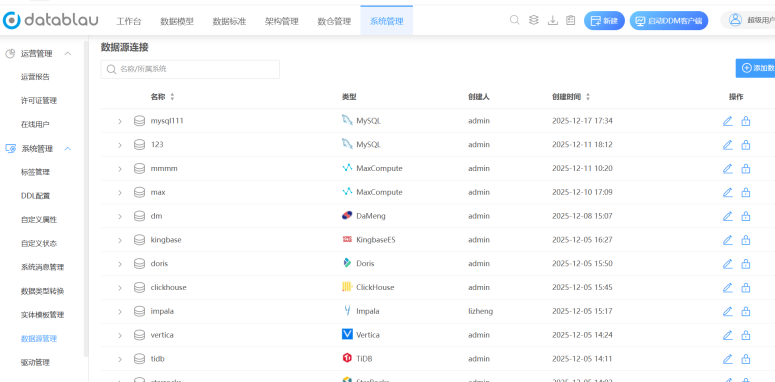
The figure shows the data source configuration interface on the server side. The focus of the figure is that the data source and permissions are unifiedly issued after being maintained in one place on the server side.
Client Visibility and Executability
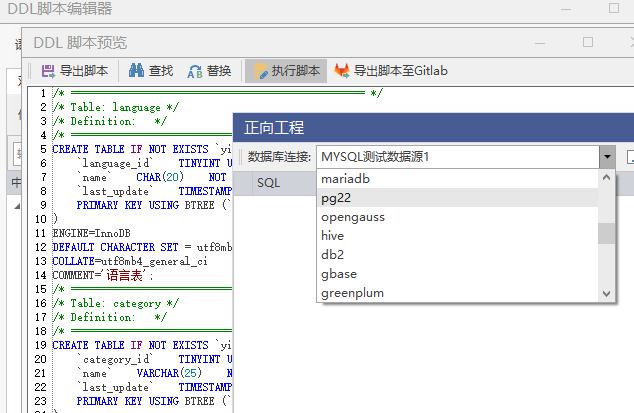
The figure shows the list of data sources when the client executes the script. The focus of the view is that the list only shows the data sources that the current user has permission to.
| Status | Client Performance | Description |
|---|---|---|
| Authorized | Appears in the list of data sources where scripts are executed | Can be selected and executed directly |
| Unauthorized | Does not appear in the list | The data source cannot be selected to execute the script |
| Not connected to the model library | Unable to retrieve the results sent by the server | Need to connect to the model library server first |
Key points to use
- Only connecting to the database will not cause the data source to appear at the script execution portal, you need to connect to the model library and have the appropriate permissions.
- The connection information of the server-side data source is not maintained by the client and cannot be modified or deleted locally.
- The data source only affects the execution export of the script, and does not affect the editing and saving of the model itself.
Notice
- When the target data source is missing from the list, it is sorted in the order of "→whether the model library is connected or not configured by the authorized → server".
- Verify that the selected data source is consistent with the target library before executing the script to avoid executing on the wrong library.
- Use Client Unified Data Source Management when a native self-maintained connection is required.