
Manage Schema Assets
This page explains the creation and routine maintenance of business object-side assets: topic domain grouping, new creation, viewing, editing, deletion of topic domains and business objects, and how to supplement extended properties. The application domain and application system on the application side are shown in Management Application Domain and Application System, and the release and abandonment status are shown in Management Architecture Asset Lifecycle.
Asset Hierarchy & Portals
| Hierarchy | New Portal | Subordinate Objects | Delete Restrictions |
|---|---|---|---|
| Subject Domain Grouping | [New Subject Domain Grouping] Button | Subject Domain | Cannot be deleted if a subject domain exists under the grouping |
| Subject Domain | New Subject Domain button after grouping | Business Objects | Cannot be deleted if there are Business Objects under the Subject Domain |
| Business Objects | Create Business Objects button under the subject area | Logical Entities, Properties | Status Thresholds on the Lifecycle page |
You cannot directly create a new business object under a subject domain grouping, you must first create a subject domain. When you delete a subject domain grouping or subject domain, the system will confirm it twice, and migrate or process subordinate objects before deleting it.
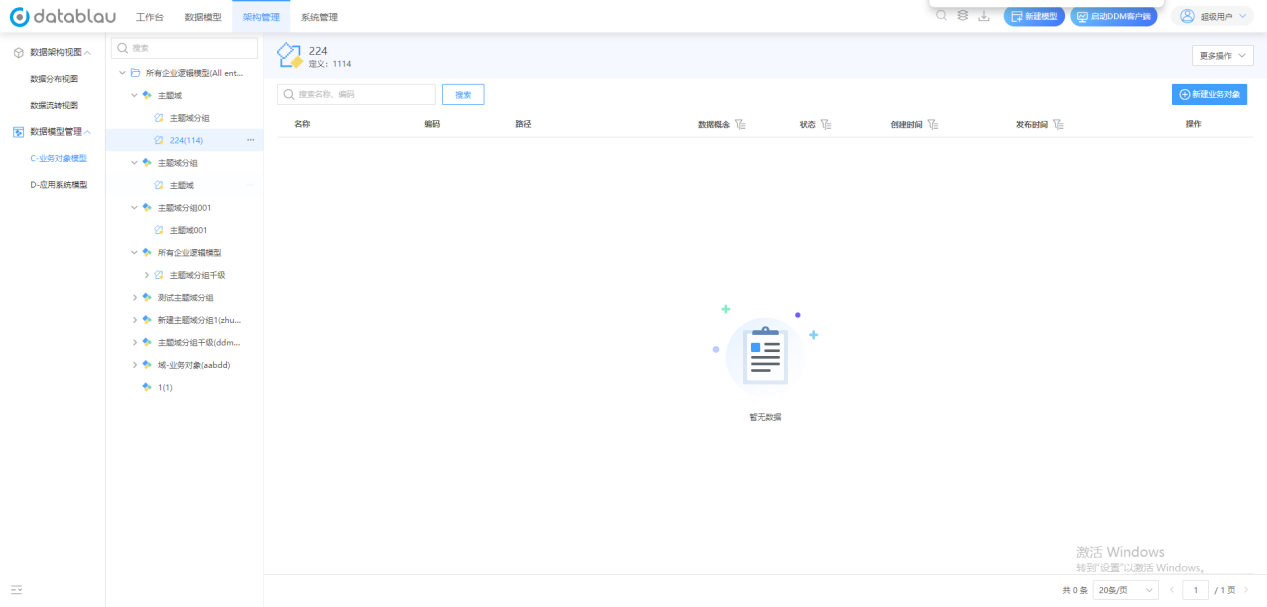
Illustration The detail page after the theme domain is selected: the left directory displays the Chinese and English names, the upper right side displays the definition information, and the list below is the list of business objects under the theme domain.
New & Edit
- Enter the Business Object Model area of Data Model Management.
- Click [New Subject Domain Grouping], fill in the Chinese and English names, codes and definitions, and complete the creation after confirmation.
- Select the group and click [New Topic Field] to add the responsible person and description.
- Select the subject field, click [Create Business Object], and enter the new page to fill in the name, code, definition, responsible department and extended properties.
- Select the object when you need to adjust, click [Edit] to modify the properties and confirm.
After selecting any object, the left directory displays the name and English name, and the right side displays the definition information and the subordinate list, which can be used to check whether the hierarchy is correct.
Business Object Status Threshold
The viewing and editing portal of business objects is open to all states, and state change operations are controlled according to the following table:
| Current State | Allowed Actions | Prerequisites |
|---|---|---|
| Draft (unpublished) | Edit, publish, delete | Publish requires approval process |
| Published | Edited, Deprecated | Published objects cannot be deleted directly |
| Abandoning for Approval | Pending for Approval | Objects remain in publishing state until approval is complete |
| Abandoned | Deleted | Automatically unbinds the model that binds the object after deletion |
See the Management Architecture Asset Lifecycle for a complete description of the approval turnover and change history.
Extended Properties
Extended attributes are used to record industry, organization, or project-specific information.
- In the Business Object Model area, click More Actions → Extended Properties.
- Create an extended property that defines the name, type, and whether it is required.
- Once added, the extended properties appear in the basic information of the business object.
Attribute definitions should be maintained uniformly by administrators, avoiding duplicate field creation across teams. See Managing Business Objects and Entities for a viewing portal for extended properties.
Bulk Maintenance
Obtain the Excel template through [More Actions → Download Template], fill in and import, and the system will update according to the business object code; [More Actions → Export Business Objects] can export all business objects in the current directory to local. See Import Export Schema Assets for template filling rules and external tools synchronization.