
Get started
This page presents the full path from preparation to validation to the Architecture team using Archy for the first time. First confirm the structure hierarchy, object coding rules, approval process, and model library directory adopted by the organization, and then start construction to avoid duplicate objects and error correlation caused by batch import of asset post-replenishment rules.
Confirmation before use
| Matters | Contents of Inspection |
|---|---|
| Accounts and permissions | Current account has Archy permissions, as well as view or maintain permissions for the destination directory |
| Approval Process | Admin has configured the release process for Business Objects and Applications, see Model Approval |
| Modeling Environment | DDM Client connects to the same model library for creating logical models, physical models, and object relationships |
| Segregation of duties | Responsibility for business areas, subject areas, application areas and application systems identified |
| Stock Assets | Harmonized coding, name and hierarchical path prior to import |
Understanding Architectural Objects
| Object | Purpose |
|---|---|
| Subject Domain Grouping | Parent classification of subject domains, business objects cannot be created directly under the grouping |
| Subject Domain | Business Objects in the Same Business Scope as the Organization |
| Business Objects | Describe stable business concepts that can be linked to business object logical models |
| Logical Entities and Properties | Refining the Data Structure of Business Objects |
| Application domain | Organization of application systems with a common business or technical scope |
| Application | Represents the system that carries the data, which can be bound to a physical model |
First Architecture Modeling
- Create subject domain groupings and subject domains in the Business Object Model area of Data Model Management, as described in Managing Schema Assets.
- Create a test business object under the subject field with the code, name, definition, and responsibility information.
- Create the application domain and test the application system in the application system model area, see Manage Application Domains and Applications.
- Create a business object logical model in the DDM Client and associate the published business object in the Enterprise Schema tab of the model properties.
- Create a physical model, select the target application system in the database properties, and save the model to the model library.
- Initiate model release approval in the model library. After passing, return to Archy to check the entities and properties under the business object. See Through Data Model.
- Create a small number of CRUD relationships in the field editor or toolbox, see Maintaining CRUD Relationships.
- See if the data distribution view and flow results match expectations.
- Check the Knowledge Graph and Change History in the business object details.
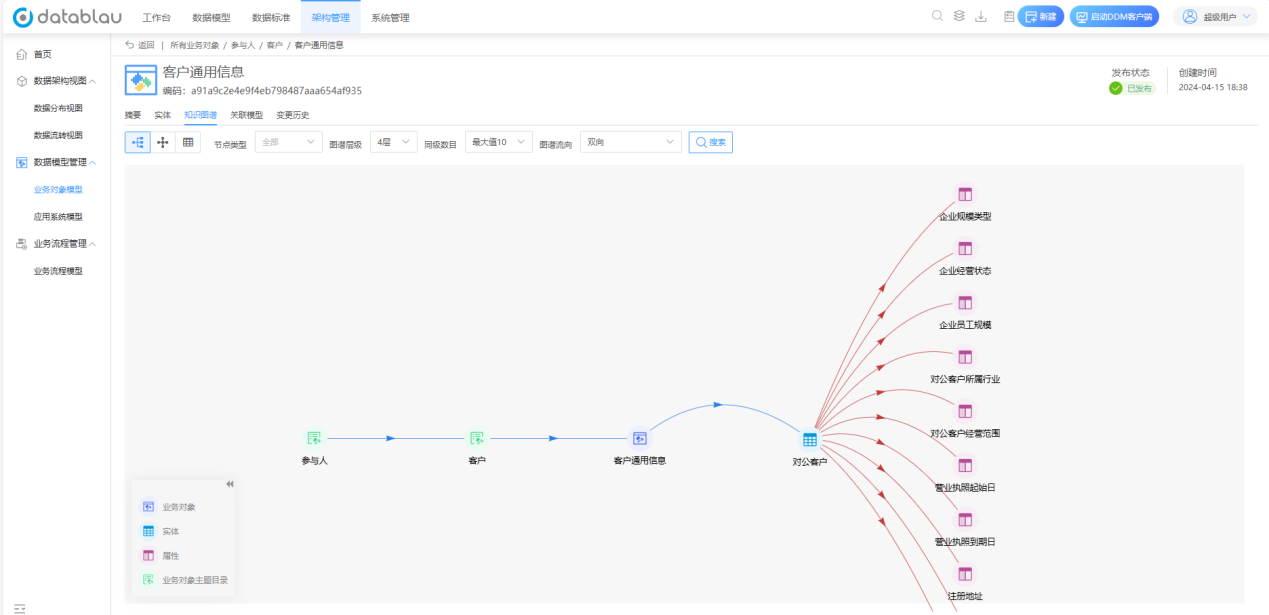
The details of a business object in the Business Object Model workspace are shown in the figure. The release status in the upper right corner and the Knowledge Graph tab are the two locations that should be checked with emphasis after completing the above steps.
Construction Sequence
It is recommended to first build a stable catalog of business objects and application systems, then associate logic and physical models, and finally maintain CRUD and circulation relationships. When the upper-level objects change frequently, the lower-level models and views are repeatedly adjusted; before the formal promotion, end-to-end verification is completed with one business domain.
When batch importing, publishing, or scrapping is involved, first verify the template and process in the test scope, and keep the export file as the basis for the change, see Import and Export Schema Assets.