
Data marketplace quick start
Describe purpose, scope, and expected output before searching and requesting products.
1. Discover candidates
Use Search or browsing by names, subjects, and descriptions. For customer analysis, state objects and measures first; examples do not promise installed products. Confirm candidates or absence after checking filters and permissions.
2. Assess suitability
Inspect definitions, sources, paths, and properties. Request Folder browsing access if needed. Same-name products can differ by system/meaning. Samples support understanding, not authorization. Record why each candidate meets or misses requirements.
3. Request now or use the cart
Use Request Now for one item or Add to Cart for several, then verify the list.
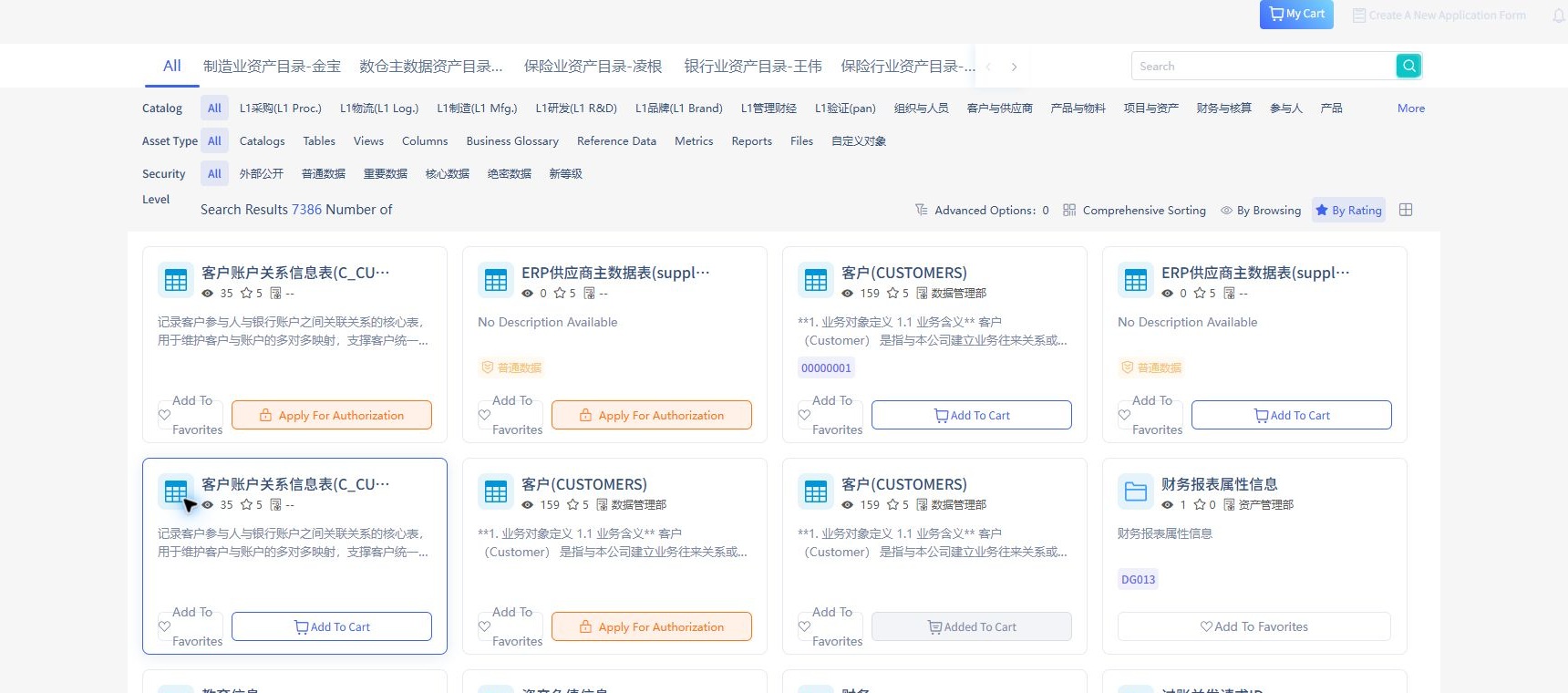
Example names illustrate controls. Check no objects are missing/incorrect. Cart membership is not submission.
4. Submit and track
Complete Request information, including purpose, delivery preference, description, and duration as available. Actual required fields follow the configured form. Use supported supplementary fields for other explanations.
Verify records, workflow, and status. Correct rejections before resubmitting. Applicants follow configured workflows rather than designing each request. For missing products, use New Request with a text need. Completion requires traceable approval records, not just a populated cart.
5. Coordinate and accept offline delivery
Contact IT or the responsible provider with approval evidence. Verify delivery against authorized purpose/scope and report differences. DAM retains request/approval records; actual files, accounts, and interfaces are delivered offline. Complete acceptance to close the usage lifecycle.