
Request browsing access and data use
DAM records needs and approvals. IT or other teams deliver offline; approval does not automatically provision connections, files, or APIs.
Request folder browsing access
- Find a locked folder or restricted asset.
- Select Request Access and confirm the folder.
- Complete and submit the form.
- The folder approver follows the configured workflow.
- Reopen after approval and verify detail scope.
Browsing rights do not authorize actual data use.
Request data use
- Select Request Now from details.
- Choose data and complete purpose/information.
- Verify objects, scope, responsibilities, then OK.
- Track the configured workflow in request history.
- Coordinate approved delivery and retain acceptance evidence.
Forms differ by workflow.
Complete request information
Follow asterisks, validation, and current options rather than treating examples as universal requirements.
| Field | Guidance | Check |
|---|---|---|
| Purpose | Actual business activity | Honest scope |
| Delivery method | Requested delivery preference | Does not automate delivery |
| Asset description | Objects, columns, scope, definitions | Essential for new requirements |
| Reason | Work requiring this data | Consistent with purpose/scope |
| Urgent | Actual urgency | Does not bypass approval or promise timing |
| Validity | Long-term, days, or custom dates | Does not automatically expire offline accounts |
| Attachments | Supporting materials | Authorized sharing and size limits |
The verified form requires purpose, delivery method, and validity. Text and upload limits appear on the page; correct oversize input before retrying.
Example structure for a text requirement:
Business goal: Reconcile monthly measures for a business subject.
Scope: Identify systems, objects, columns, and time range.
Output: Detail or aggregate results and required definitions.
Use: Users, purpose, and expected duration.
Replace this writing guidance with actual needs.
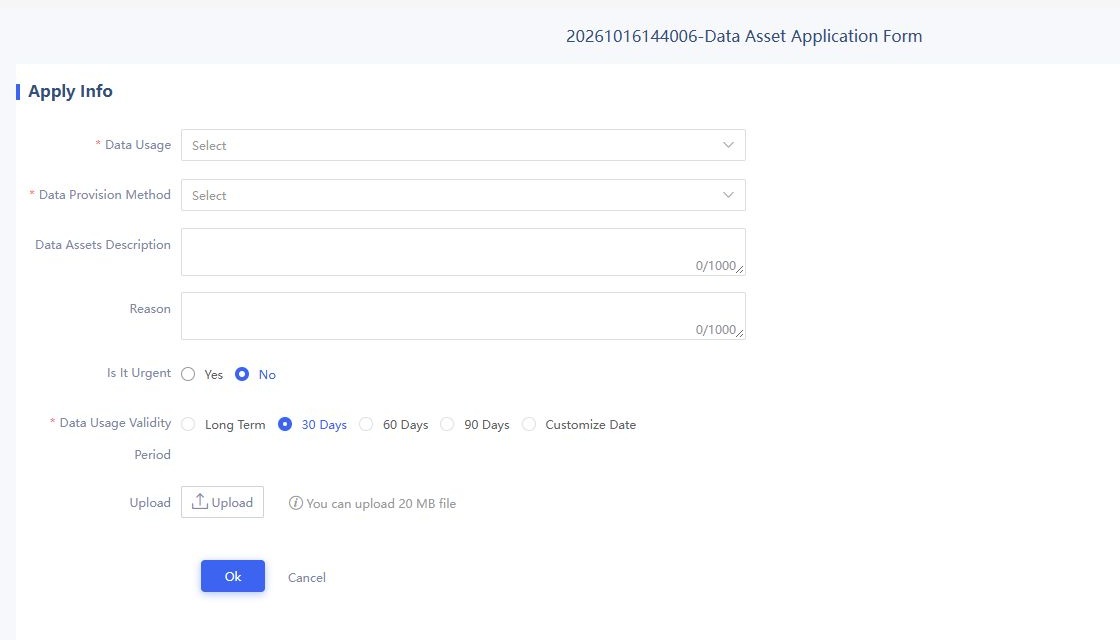
Verify asset lists and actual workflow fields before submitting.
Combine requests in the cart
Add related products, remove duplicates/unneeded items, and submit together. Adding alone does not initiate approval.
Request data without an existing product
Use New Request in Data Supermarket. Describe data, business purpose, scope, and delivery expectations in available fields; these suggestions do not imply separate fixed fields.
Separate approval from delivery
| Stage | DAM | Offline |
|---|---|---|
| Need | Objects/text and request record | Business explanation |
| Approval | Participants, comments, outcome | Coordination |
| Approved | Retained evidence | Actual delivery |
| Acceptance | Compare approved scope/purpose | Check supplied content |
See Workflow management. Correct rejected requests; contact the provider for approved-but-undelivered data instead of repeatedly reapplying.
Troubleshoot requests
| Symptom | Action |
|---|---|
| Cannot choose purpose/method | Check loading/errors; administrator verifies options/services |
| Required-field failure | Complete prompted fields beyond free text |
| Header only/loading failure | Record time, entry, error; check service, not assumed empty market |
| No success evidence | Check existing record/state before retrying |
| Wrong delivery method | Compare request/approval with provider |