
Governance capabilities
DIG interprets goals, calls configured DAM tools, and generates proposals for review. Available capabilities depend on license, agent, model, Skills, MCP, internal services, and user permissions.
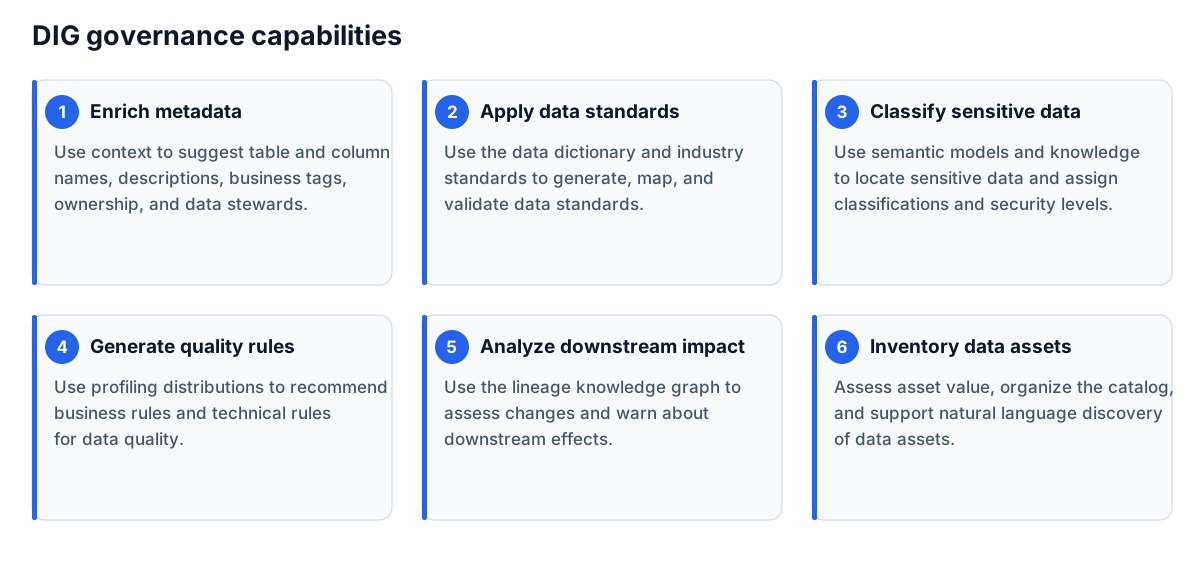
Enrich metadata
Generate candidate Chinese business names and descriptions for harvested tables or fields with incomplete business metadata.
Prepare target sources, tables or fields, business domain and purpose, terminology and naming rules, and confirmed reference objects or documents.
- Select an enrichment agent and target objects.
- Specify attributes and naming constraints.
- Check omissions and exceptions after generation.
- Compare current and proposed values in approval, then edit, approve, or reject.
Ensure descriptions convey business meaning rather than restating physical names. Check that unrelated objects have not received the same generic description. Verify subsequent attribute status in metadata management.
Generate data standards
Generate candidate standards from domain semantics and enterprise rules. Candidates still require the standards publication workflow.
Prepare domain and scope, standard type, naming and coding rules, definitions, data types, lengths, value domains, and the existing catalog for duplicate checks.
- Select standard generation and bound the objects.
- Reference current policies or templates.
- Generate candidates and inspect duplicates.
- Review definitions, technical properties, and applicability.
- Follow the data standards publication workflow after approval.
Check that definitions are actionable and that types, lengths, and value domains fit actual fields.
Generate quality rules
Generate candidate business and technical rules from structures and business requirements. Prepare tables, fields, schemas, validation requirements, quality dimensions, value domains, thresholds, null and uniqueness constraints, execution scope, and owners.
Verify business-to-technical rule associations, expressions against the target source, and evidence for thresholds. After approval, check rule configuration, tasks, and execution in Data Quality. A natural-language proposal is not an executed rule.
Classify data and assign security levels
Propose classifications and levels using enterprise taxonomies, level rules, and usage. Prepare current classification and level schemes, objects and use cases, regulations, policies, and exceptions.
- Select data scope and the classification capability.
- Specify the taxonomy and level scheme.
- Generate proposals and prioritize sensitive or high-level objects.
- Have the security owner review missed classifications, false positives, and level rationale.
- Verify approved results in Data Security.
Map and validate standards
Standards mapping proposes associations between fields and applicable standards. Validation checks whether existing mappings remain appropriate.
Prepare current published standards, field business and physical names, descriptions and technical properties, scope, and exclusions. Review candidate standards, rationale, and confidence. Prioritize low-confidence proposals, incompatible types, retired standards, and fields lacking semantics. Verify actual mappings in Data Standards or Metadata Management after approval.
Inventory assets
Identify and organize candidate assets for cataloging, ownership confirmation, and publication. Prepare systems, domains, scope, enterprise asset definitions, catalog categories, owners, use cases, and value information.
- Select inventory scope and asset perspective.
- Provide asset definitions and catalog rules.
- Review candidates and missing information.
- Have business and asset owners confirm ownership, names, value, and access scope.
- Enter the formal catalog workflow after approval.
DIG does not determine ownership or publication scope on behalf of accountable owners.
Proactive governance
Resident background tasks detect metadata changes and initiate configured governance rather than waiting for individual requests. Proactive triggering does not authorize proposals to bypass review.
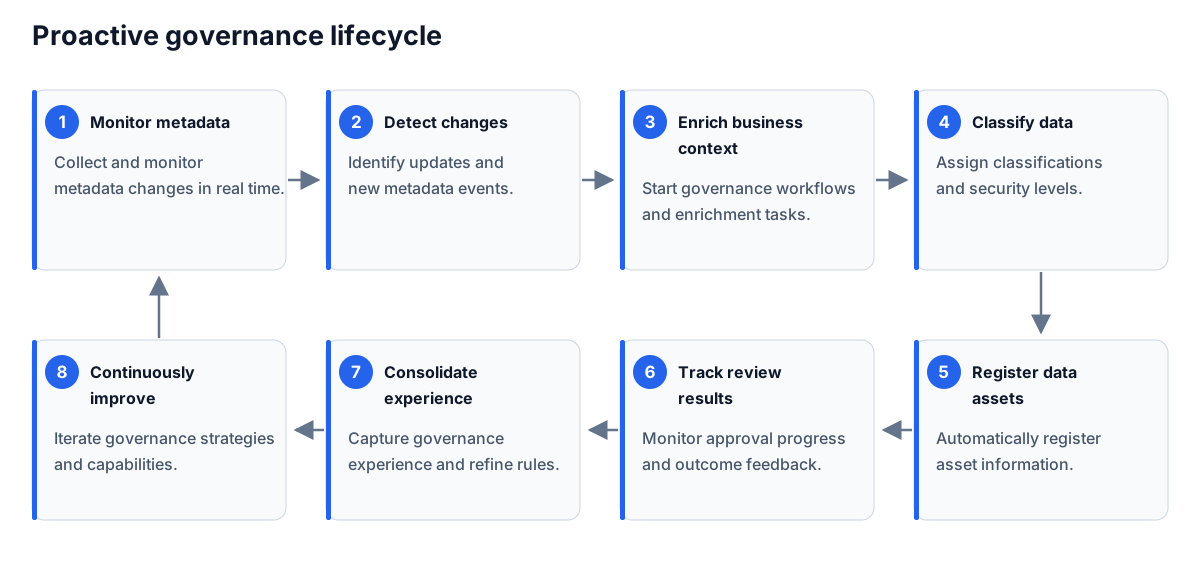
An administrator enables the resident task in Nacos. It listens for changes and runs business metadata enrichment, standards mapping, classification and levels, and asset organization sequentially, generating approval requests. Verify sources, agent settings, and reviewers first. Obtain the actual deployment setting rather than guessing its name in a conversation.
Match metadata changes to generated tasks, then inspect proposals and decisions. Investigate unexpected proposal volume before batch approval. Complete the cycle through discovery, proposal, review, target verification, and rule improvement.
Assist lineage analysis
Use available SQL, lineage, and metadata context to analyze parsing failures, explain operators, or summarize impact.
In a SQLink lineage space, hover over the status of a failed or partially successful SQL file. In the failure dialog, choose Generate Preprocessing with AI to open a conversation. Check the generated script added to the task, compare original and processed SQL, and parse again. Script generation does not establish correct parsing or lineage.
To explain an operator, click its magic wand. For impact analysis, specify the object and intended change, then compare the answer with actual SQLink nodes, relationships, and code.
Completion checks
- Actual objects match input scope.
- Referenced policies are current and applicable.
- Omissions, failures, and low-confidence proposals have outcomes.
- Reviewers have domain expertise and data permissions.
- Approved results are verified in the target module.
- Conversations, decisions, and results are traceable.
Troubleshooting
| Symptom | Action |
|---|---|
| Proposals conflict with policy | Check documents, prompt, and agent configuration; reject incorrect proposals |
| Scope is too large or times out | Validate a smaller sample, then process batches |
| Many objects are unprocessed | Check permissions, metadata completeness, and tool errors |
| Similar errors recur | Summarize review feedback for prompt, Skill, or service improvements |