
Configure recognition algorithms, rules, and tasks
Follow algorithms, rules, tasks, confirmation, then review/publication. General rules can use library expressions. Cascade/ML options depend on deployed features.
Maintain the algorithm library
- Open System Settings > Recognition Algorithms > Algorithm Library and prepare a folder.
- Select New in the algorithm list, not the folder tree. Enter name, folder, and expression.
- Test one input, then positive/negative cases.
- Save and search by name/description; edit as needed.
Editing referenced algorithms warns of impacts. Referenced algorithms and parent algorithms with children cannot be deleted. Import/export templates through More Actions and inspect task progress. No selection exports all; selection restricts scope. Nonempty folders cannot be deleted.
If available, Machine Learning Algorithms > Try It shows candidate categories/scores. On a 0–1 scale, higher scores indicate relative match likelihood, not compliance or published levels. Otherwise use general rules and tests.
Test a regular expression with synthetic codes
This tests text only without querying business data or saving an algorithm.
- Enter a test name and accessible folder; required fields are validated before testing.
- Choose Regular Expression and enter
^[A-Z]{2}[0-9]{4}$. - Test
AB1234and expect a match. - Test
AB12and expect no matching content. - Cancel afterward. For production, use business-approved expressions and samples before saving.
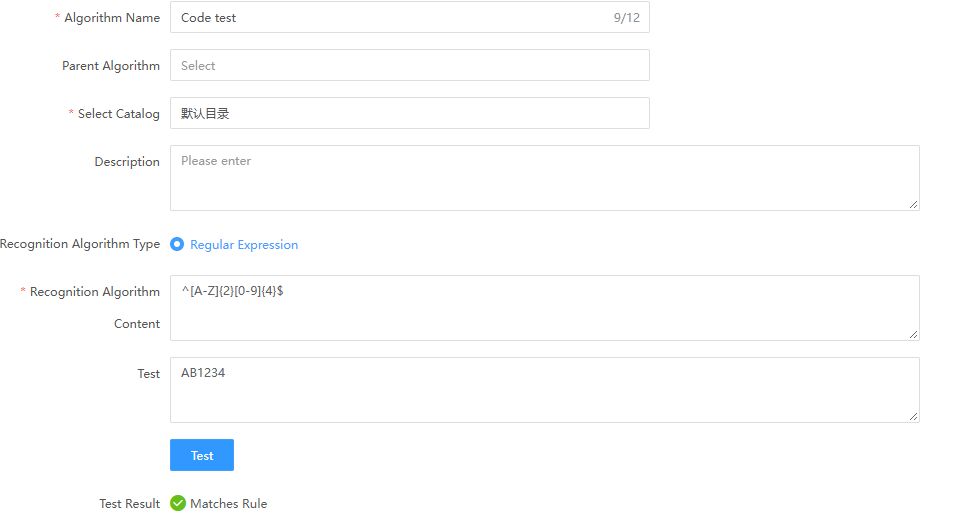
| Input | Result | Reason |
|---|---|---|
AB1234 | Matches | Two uppercase letters and four digits |
AB12 | No match | Too few digits |
This illustrates matching direction, not an enterprise code policy. Test object-level conditions and task results before classification confirmation.
Configure recognition rules
Open Classification Tools > Intelligent Classification > Recognition Rules. The verified creation menu offers General Rule. Use other types only where available.
| Type | Focus |
|---|---|
| General | Information-item or classification target; AND/OR conditions; small-sample tests |
| Lineage cascade | Downstream recommendations; unlike inventory's two-direction cascade |
| Machine learning | Table, table-dependent column, independent column, or information-item target; category, priority, threshold, count |
Referenced rules cannot be deleted. Review affected scope after changes.
Test general rule conditions
- Select New > General Rule.
- Choose Information Item or Data Classification. For classification, choose table/view/entity or data-item granularity and the category.
- Enter name, folder, description, priority, and AND/OR groups.
- Test Conditions on a few known metadata objects.
- Compare expected matches/nonmatches before saving.
Include negative examples; large tests take longer.
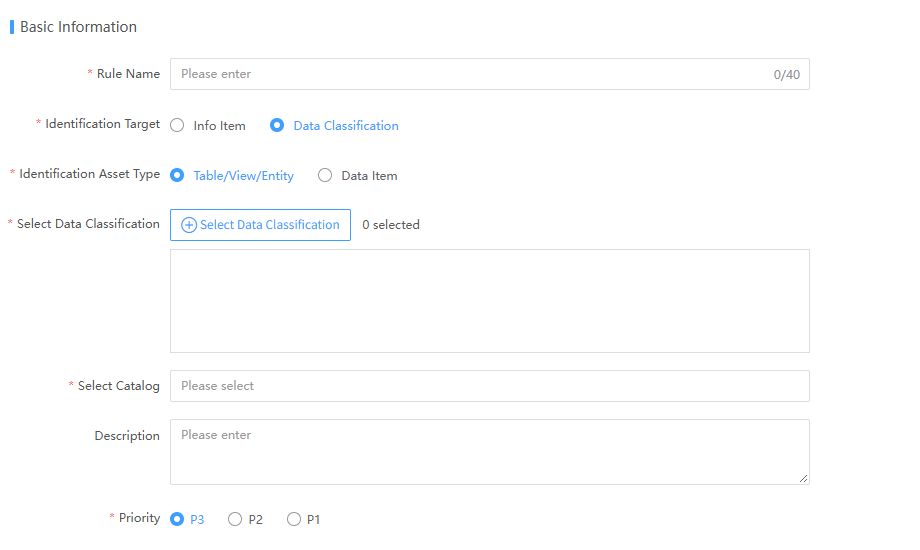
Some interfaces label security classifications Data Classification. Recheck selected categories/conditions after changing target/type.
| Control | Check |
|---|---|
| Name | Purpose and length limits |
| Target | Determines category/information-item selection |
| Asset type | Table/view/entity versus data item |
| Target object | Select an existing object, not just descriptive text |
| Folder/description | Ownership, scope, evidence |
| Priority | P1/P2/P3; do not infer conflict outcomes from labels |
| Groups/test | Compose conditions, test known positives/negatives |
Configure machine learning
Choose the table category, a classified parent for dependent columns, an independent column category, or an information item as appropriate. Record folder, description, and priority and check overlapping rules. Threshold constrains candidate scores, not final sensitivity. Recommendation count limits classifications, not sampled rows. Table classification is not every column's final level.
Create and run tasks
- Prepare a task folder.
- Create a task and add rules.
- Save, check scope, and enable if needed.
- Run and inspect completion; submission success is not completion.
- Copy to reuse, rename, and recheck rules/scope.
Enablement and execution differ. Search names fuzzily. Nonempty task folders cannot be deleted. Preserve required run/review evidence before deletion.
Confirm results
In Recognition Result Confirmation, also called Recognition Results, filter by asset, system, source, harvesting name, table, or level. Verify identity/class/level and edit where needed.
| Action | When | Verify |
|---|---|---|
| Edit classification/level | Correct object, wrong suggestion | Both associations independently |
| Submit for Review | Reviewed candidates | Pending workflow, not publication |
| Reclassify | Rework evidence | Returns to To Classify and can join later runs |
| Defer | Exclude this round | Deferred state and reason |
Reviewers Approve and publish; rejected objects require reclassification. Deleted metadata can produce partial failures; inspect rows. With no results check execution, scope, tests, and conditions. Fix mass false positives instead of publishing for coverage.