
Data quality quick start
Start with one clear requirement, one technical rule, and a limited task. Prepare a readable source, stable primary key, quality folder, and responsible users.
1. Define the requirement
Follow Business rules to specify scope, valid conditions, and failures, then publish. A non-null business identifier is only an example; confirm actual columns and scope with the business.
2. Create a technical rule
Choose a method available in Technical rules. The verified creation page supports SQL and data comparison. Use expressions or functions only where available. SQL selects failures; regular expressions describe valid formats. Use a stable key for verification.
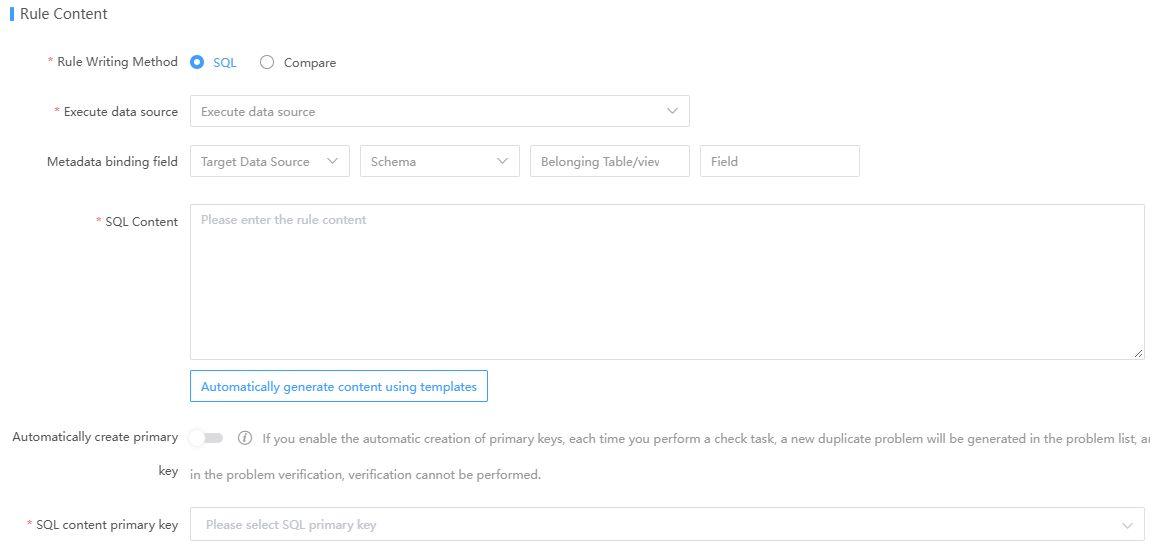
SQL Content Primary Key, Total Record Count Calculation, and Issue Count Calculation identify records and calculate statistics respectively. They are not interchangeable. Click to open the full image.
3. Create a validation task
Add published rules to a Validation task. Set system, interval, and recipients. Inspect history and failures after the first run to confirm pass/fail logic.
4. Remediate issues
Inspect Issues, assign authorized owners, fix source data, document solutions, and mark fixed and closed through the workflow.
5. Verify resolution
Confirm all records pass verification. Reopen failed or partially passed issues where permitted. Add reusable solutions to the knowledge base.
Completion criteria
Rules, tasks, issues, and verification are mutually traceable. Execution success, issue closure, and successful verification are separate conclusions.