
Design a custom metamodel
Metamodels define structure; metadata records instances. Prefer built-in database and REST API models where suitable; customize for enterprise-specific objects.
Define four elements
| Element | Meaning | Design question |
|---|---|---|
| Model | Overall asset structure | What scope is managed? |
| Object | Entity type | What hierarchy exists? |
| Property | Object characteristic | What information is recorded? |
| Relationship | Hierarchy, reference, association | How are objects connected? |
Diagram objects and relationships first. Define shared identifiers, names, and descriptions. Avoid speculative unused properties.
Create a model
- Open Metamodels and create a model.
- Enter a stable, meaningful code, name, and description.
- Open the editor. ID and GUID are system-generated and read-only.
- Review data and structure areas, then create objects, properties, and relationships.
Edits save immediately. Assess production impacts on harvesting, templates, and data before changing a model; closing the page does not cancel edits.
Complete basic information
| Field | Purpose | Guidance |
|---|---|---|
| Code | Stable system identifier | Meaningful English code; avoid later changes |
| Name/alias | Display and business identification | Describe the managed object; avoid temporary project abbreviations |
| Description | Goals and scope | Systems, team, exclusions |
| ID/GUID | Internal identity | System-managed |
A code identifies one structure. For parallel structures, create another model or plan a migration before replacing production definitions.
Assemble the structure
- Create objects with names, aliases, descriptions, and icons.
- Enable asset registration only for types intended for the catalog.
- Define properties centrally and reuse synonymous properties.
- Set controls, groups, and display order; ungrouped properties use the default group.
- Use Associate Properties on objects.
- Use Associate Objects for hierarchy and business relationships.
- Edit the root and associate shared properties and business objects.
Root associations are required. Unassembled definitions can prevent template generation, imports, or complete display.
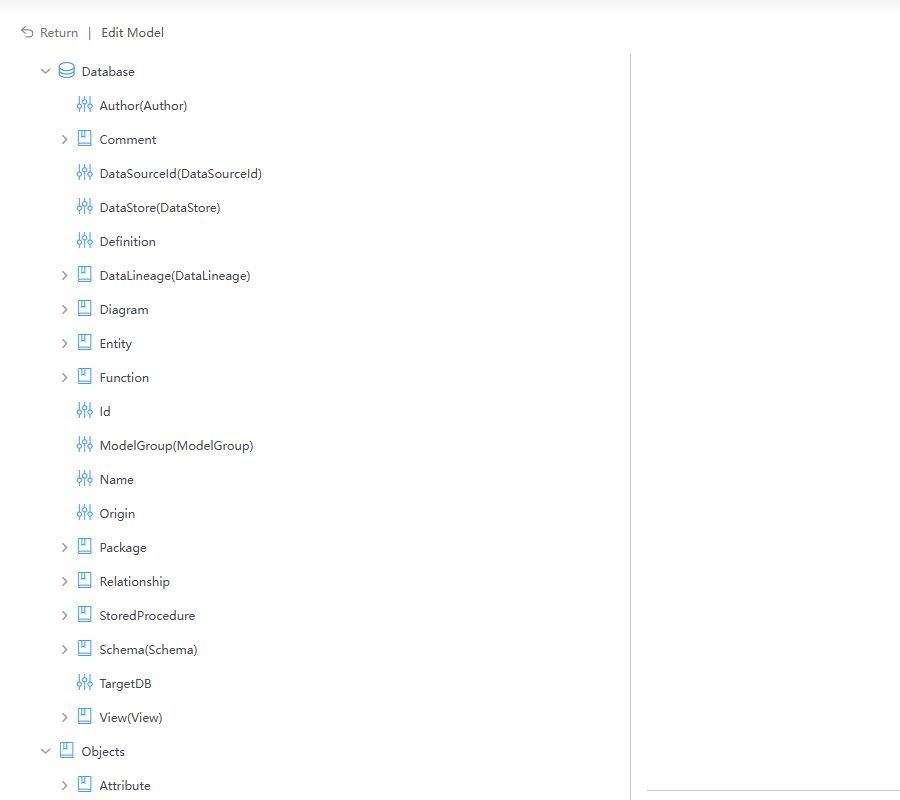
The screenshot identifies association areas. Use names from your own design.
Review the five design steps
Step 1: Create object types
List actual entity types, such as Agent, Goal, Knowledge, Memory, and Model. Types define detail pages and permission boundaries, not individual records. Enable Allow Asset Registration only where needed.
Step 2: Create properties
Define each meaning once. Choose controls, groups, and order, including suitable date, enumeration, and long-text controls.
Step 3: Associate properties
Select existing properties using Associate Properties. This references rather than copies them. Check all references before changing a shared property.
Step 4: Define relationships
Use directional, meaningful names for parent-child, reference, dependency, and business relationships. Do not turn a possible association into a hard dependency that misleads searches or impact analysis.
Step 5: Assemble the root
The root is the entry to instances. Associate shared ID, name, logical name, and definition, then object types. Preview the template to check hierarchy and grouping.
Follow design principles
- Start from business objects rather than database tables.
- Keep essential task-related properties first.
- Keep core object/property codes and relationship direction stable.
- Allow future extension without speculative fields.
- Apply consistent naming and record definitions.
Validate before publication
Use a small sample to verify:
- Template generation and root ID/Name rules.
- Expected object tree without cycles.
- Readable property groups and order.
- Only intended types are available for asset registration.
- Consistent identifiers across harvesting, import, and lineage.
Verify the design
Check templates, hierarchy, groups, order, unique names, and accidental duplicate properties. Then create instances using Metamodel import.
Object associations are not automatically transformation lineage. Supply separate source-target relationships where needed.