
Create and publish technical rules
Screenshot note: Screenshots are illustrative. Controls or labels may remain untranslated in the demo release, and pages without a faithful English capture retain the source illustration. Control names and layouts can vary by release.
Technical rules implement published business rules against data sources. Prepare source connections, tables and columns, failure criteria, and stable keys.
Create a rule
- Go to Rule Management > Technical Rules > New.
- Enter a name and select a published business rule and type.
- Select the authoring method; configure source, system, model, table, column, and database type as applicable.
- Set content, maximum errors, and execution parameters against requirements.
- Save and request publication. Only published rules can join tasks.
Verify required Issue Business System, Business Rule, Owner, Rule Type, and Business Type fields. Issue ownership may differ from the source's system. Use Test before saving.
Understand the four rule methods
Some deployments offer only SQL and comparison. Use regular expressions or functions only at their own available entry points.
| Method | Configuration | Failures |
|---|---|---|
| SQL | Source, SQL, result key, total count, issue count | Returned records |
| Regular expression | Source, column, key, expression, row limit | Nonmatching records |
| Function | Built-in template, parameters, system, standards or columns | Function-detected failures |
| Data comparison | A/B sources and SQL, relationship, total count | Records violating the relationship |
SQL selects failures; regular expressions describe valid values. Do not reverse these conventions.
Configure SQL rules
Return only failures and choose a returned column as SQL Content Primary Key. Total Record Count Calculation returns all records in scope; Issue Count Calculation returns failures using the same scope.
Configure Pre-execution SQL, Post-execution SQL, and parameters only as needed. These statements execute; have a source specialist review them.
Automatic primary key generation is available without an existing key, but each run creates a new issue list and verification is unavailable. Agree on a stable identifier for continuous tracking.
Configure regular expression and function rules
Set the row limit and primary key for expression rules. Generated keys have the same verification restriction.
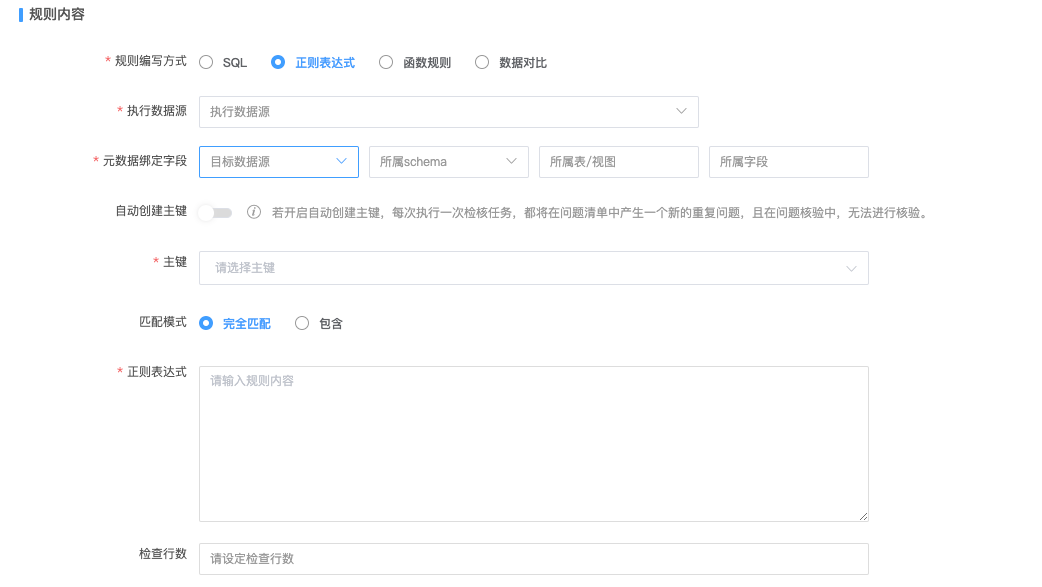
Set row limits and matching behavior against requirements. For functions, select a built-in template and parameters, choose the system in associated data, and add standards or columns. Standard-based rules dynamically check mapped columns; verify that scope.
Configure data comparison
Set sources and SQL for datasets A and B and define their relationship. Compare returned results with aligned meanings, types, and filters. Distinguish extraction timing differences from business errors.
Publish and maintain rules
New rules start unpublished. Submit approval or use simplified Save and Publish. Unresolved issues block changes and deprecation. Permitted edits create a draft that replaces the original after approval.
Import templates, export query results, and filter by name, status, or system. Delete unpublished rules, deprecated rules, or drafts where permitted.
Check before execution
- SQL returns failures; expressions describe valid formats.
- Keys are stable and unique and support verification.
- Total and failure counts match the actual scope.
- The account has read access and the rule is published.
Next: Create a validation task.