
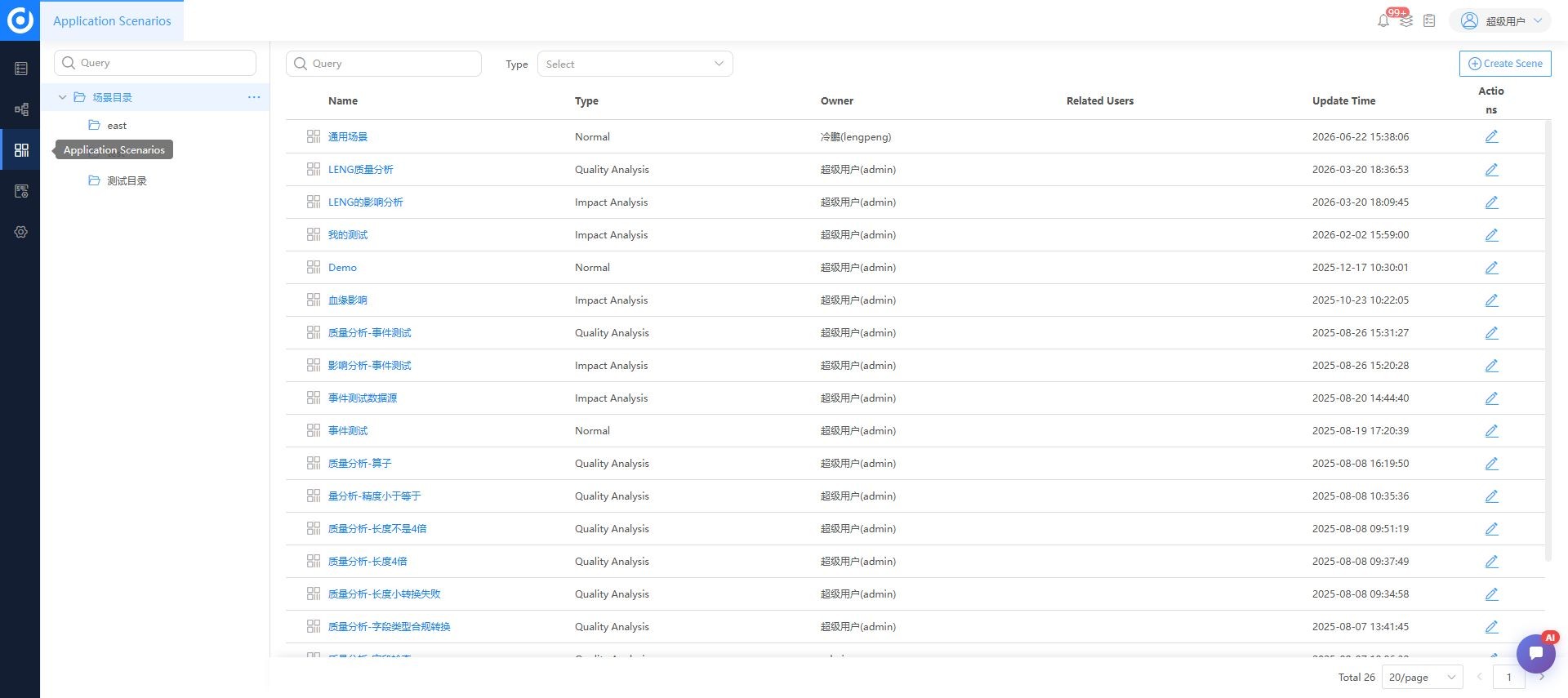
Application scenarios
Screenshot note: Screenshots are illustrative. Controls or labels may remain untranslated in the demo release, and pages without a faithful English capture retain the source illustration. Control names and layouts can vary by release.
A scenario saves object scope and viewing settings for a specific analysis goal. It organizes sources, entities, and metrics into a persistent business scope using existing metadata and lineage. It does not copy data or replace harvesting and parsing.
Prerequisites
Target objects must be in the catalog, key lineage must be parsed and sampled, and users need object access. Administrators assign create, edit, and delete permissions. Identify a scenario owner, objective, and result recipient.
Select catalog objects after checking system and namespace. Follow scenarios for continued observation. Sharing does not expand recipients' existing object permissions.
General scenarios
Use a general scenario to monitor a core business path and changes. A core path is the set of objects and dependencies selected for the scenario; SQLink does not determine business importance automatically.
- Open Application Scenarios and create a general scenario.
- Enter a business-specific name and description.
- Add sources, entities, or metrics from the catalog.
- Verify system, environment, and dependency scope.
- Save and inspect the core path.
Authorized users can edit scope, delete, or open management views. Confirm that monitoring and collaboration no longer depend on a scenario before deletion. Investigate change events using task logs and actual release records before deciding whether to notify owners.
Impact analysis
| Object | Purpose | Inspect |
|---|---|---|
| Data source | Assess structure or harvesting scope changes | Entities, tasks, reports, downstream systems |
| Entity | Assess tables or views | Entity and field dependencies |
| Metric | Assess definition or dependency changes | Sources, calculations, consumers |
| Task | Assess schedule or transformation changes | Inputs, outputs, dependent tasks |
Before a change
- Select the object to change.
- Set direction, level, and depth.
- Inspect direct and complete downstream paths.
- Identify critical systems, reports, tasks, and owners.
- Save or export results for review.
- Record risks and rollback in the change plan.
After a change
Repeat the same analysis and compare new, missing, or reversed relationships. Check whether harvesting and parsing were refreshed before diagnosing an implementation gap.
Impact broadcasts
Broadcasts notify relevant people of identified potential impact. They do not calculate lineage or replace change approval. Confirm automatic and manual trigger conditions, recipients, and delivery settings with an administrator.
Structural quality analysis
Check isolated tables, cycles, breaks, and upstream/downstream consistency.
Isolated tables: determine whether processing relationships are expected, related code is harvested, namespaces match, and parsing succeeds. Legitimately independent tables are not defects.
Cycles: compare iteration logic, mappings, code, and schedule records. Do not delete relationships based only on appearance.
Breaks: inspect output/input name mappings, temporary tables, cross-source connections, variables, and missing tasks.
Consistency: assess field names, types, and lengths against transformation code. Differences may be intentional transformations.
Verify results
Confirm scenario purpose, object identity, direction, level, depth, broadcast recipients, and investigation outcomes or owners for structural issues. Rerun after correcting harvesting, mappings, or code.
Troubleshooting
Objects are missing. Check harvesting, catalog inclusion, and permissions.
Impact is unexpectedly small. Check depth and filters, tasks, namespace, and coverage. Missing discovered impact does not exclude unharvested dependencies.
Issues increase suddenly. Review recent harvesting, parsing, or mapping changes and sample objects before adding manual relationships.
Related: lineage views, exploration, administration.