
Online SQL lineage
Screenshot note: Screenshots are illustrative. Controls or labels may remain untranslated in the demo release, and pages without a faithful English capture retain the source illustration. Control names and layouts can vary by release.
Analyze SQL inputs, outputs, intermediate processing, and field relationships without creating a formal parsing task. Use online results for development and investigation; manage ongoing code through formal harvesting and parsing.
Prerequisites
Use authorized SQL without passwords or tokens. Identify database syntax or engine. For DAM metadata associations, confirm namespace and default schema. First-time users can try the tutorial example.
Parse SQL
- Open SQL Lineage.
- Select a matching SQL type or engine.
- Enter SQL and optionally format it.
- Open parsing settings and configure indirect relationships and metadata association.
- Parse, then switch between table and field views to verify results.
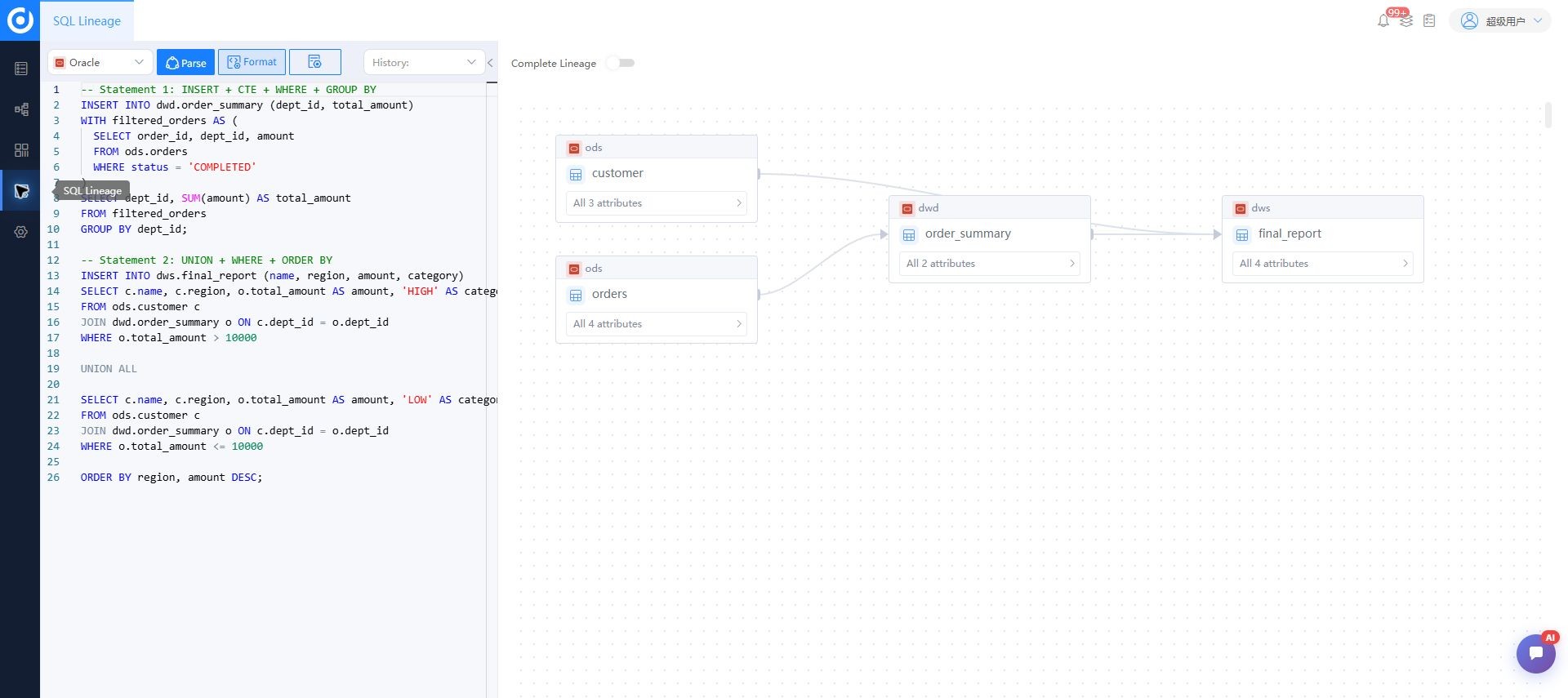
Parsing settings
| Setting | Purpose | Guidance |
|---|---|---|
| Show indirect relationships | Display dependencies through expressions or intermediate processes | Enable for complex transformations |
| Force metadata association | Bind parsed nodes to harvested metadata | Use confirmed namespace and schema |
| Namespace | Scope object identity | Match target metadata planning |
| Default schema | Complete unqualified object paths | Use actual execution context |
Wrong namespace or schema can produce unmatched or incorrectly matched nodes. Validate a known small sample first.
Read results
Blue nodes are inputs, green nodes are outputs, and yellow nodes are intermediate objects or processes. Solid lines are direct relationships; dashed lines are indirect. Table view summarizes flow; field view explains origins and transformations. The full-lineage control expands intermediate paths. Use filtering and zoom for complex SQL.
Run history
Verify SQL, type, execution time, and result when reopening history. Business code in history remains subject to access and confidentiality rules.
Verify results
- Inputs and outputs match
FROM,JOIN,INSERT, and creation statements. - Mappings explain aliases, expressions, and aggregates.
- Direct and indirect display fits the question.
- Associated objects have correct namespace and schema.
- Warnings, unrecognized statements, and missing objects are recorded.
Troubleshooting
Parsing fails. Check engine, complete syntax, database extensions, and variables. Preprocess runtime substitutions using controlled samples.
Nodes lack metadata. Check harvesting, namespace, schema, and case. Avoid matching an identically named object in another source.
The graph is too complex. Start at table level with full paths or indirect relationships hidden, then expand gradually.
Related: lineage views, quick start, administration.