
Configure access, row filters, and masking policies
Screenshot note: Screenshots are illustrative. Controls or labels may remain untranslated in the demo release, and pages without a faithful English capture retain the source illustration. Control names and layouts can vary by release.
Policies control access to data values, unlike documentation or catalog browsing rights.
Choose a policy
| Type | Purpose |
|---|---|
| Access | Allow/deny object scopes |
| Row-level access | Restrict records in accessible tables |
| Table masking | Configure column rules from a table/view |
| Column masking | Configure rules per identity from a column |
Create named/described folders first. Resolve contained policies before deletion.
Before you begin
Confirm objects, identities, purpose, row criteria, and Masking rules. Users/groups/organizations come from Organization management; objects come from harvested metadata. Test approved limited scopes first. Denying selected objects differs from allowing everything except selected objects.
Create an access policy
- Open Security Policies > Access Policies > New > Access Policy.
- Set name, description, folder, and validity.
- Select execution operation, allow/deny action, and scope.
- Verify Include, Exclude, or All at each level.
- Select users/groups/organizations; use a denylist to remove identities from an allowlist if needed.
- Save and verify actual effective access as target identities.
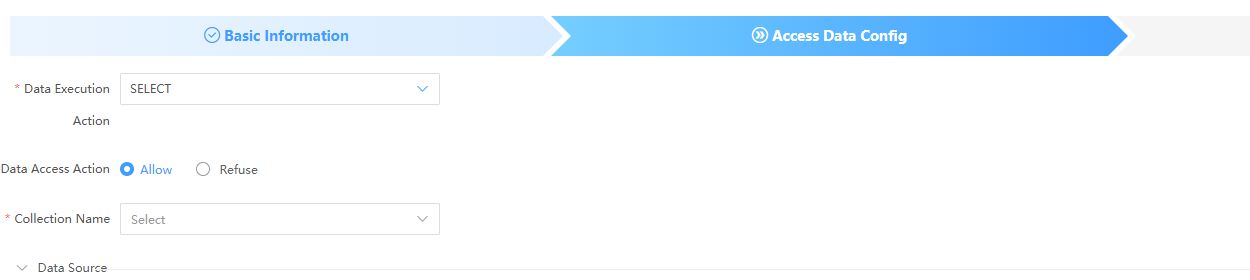
The screenshot has no selected harvesting scope and is not an effective policy example.
| Setting | Check |
|---|---|
| Name/folder | Required; clear purpose |
| Validity | Available only for allow policies as described by the form; expiry revokes access, empty means permanent |
| Execution | SELECT, INSERT, UPDATE, DELETE; grant only approved operations |
| Action | Allow/deny, checked with operation and scope |
| Harvesting name | Correct source before lower-level scope |
| Scope | All, Include, Exclude at source/table/view/column levels |
| Identities | User/group/organization and final allowlist minus denylist |
Verify expiry on the actual enforcement path. It does not establish marketplace delivery or offline account revocation.
Create row-level access
- Select New Row-level Access Policy and complete basics.
- Add tables/views and identities.
- Add row data conditions for each identity.
- Define groups and inspect generated SQL.
- Test known visible and excluded rows as that identity.
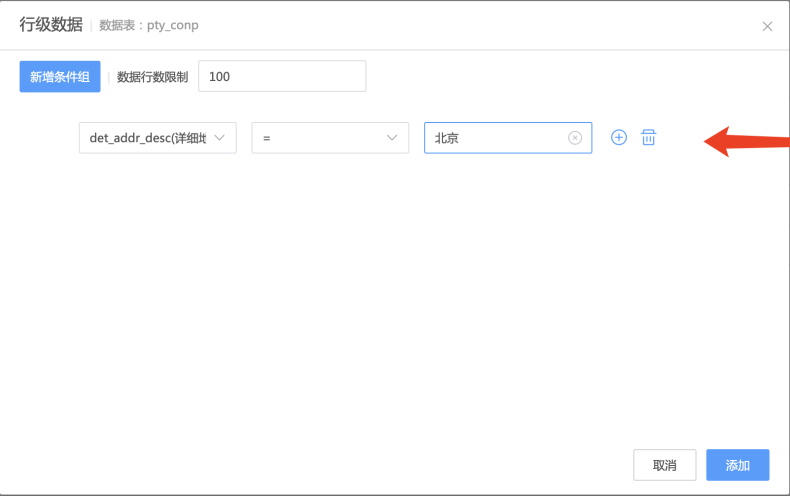
Use fields, comparisons, values, and available group controls. Locations and row limits shown are examples. After Add, inspect the identity list's SQL before saving the policy. One user's conditions do not cover all others; verify multi-condition logic.
Create table masking
- Select New Table Masking Policy and complete basics.
- Add tables/views and inspect columns.
- Associate masking rules.
- Select applicable users/groups/organizations.
- Verify target and untargeted columns.
Create column masking
- Select New Column Masking Policy.
- Add columns and identities.
- Set a masking rule for each identity row.
- Verify the same column under different identities.
Verify and maintain
Search by name, view effective scope/rules, and recheck prefilled settings when editing. Use Gateway verification; saving does not establish correct client routing. Test overlapping policies instead of assuming precedence. Record original scope/identities before changes/deletion.
| Symptom | Checks |
|---|---|
| Saved but unrestricted | Gateway route, identity, object scope, operation/action |
| Users in same group differ | Direct/group/organization grants, denylist, overlaps |
| Row filter returns nothing | Field/value/logic, matching source records, query scope |
| Some columns unmasked | Policy type, selected columns, rules, identity |
| Unexpected expiry behavior | Allow policy, validity, routing, processing logs |