
Configure metadata harvesting
Harvesting defines the source, method, and scope for retrieving metadata. New configurations have four categories: Data Source, Report, File, and Metamodel. Connections, plugins, configurations, and execution are separate steps. Saving a connection or configuration does not produce searchable metadata.
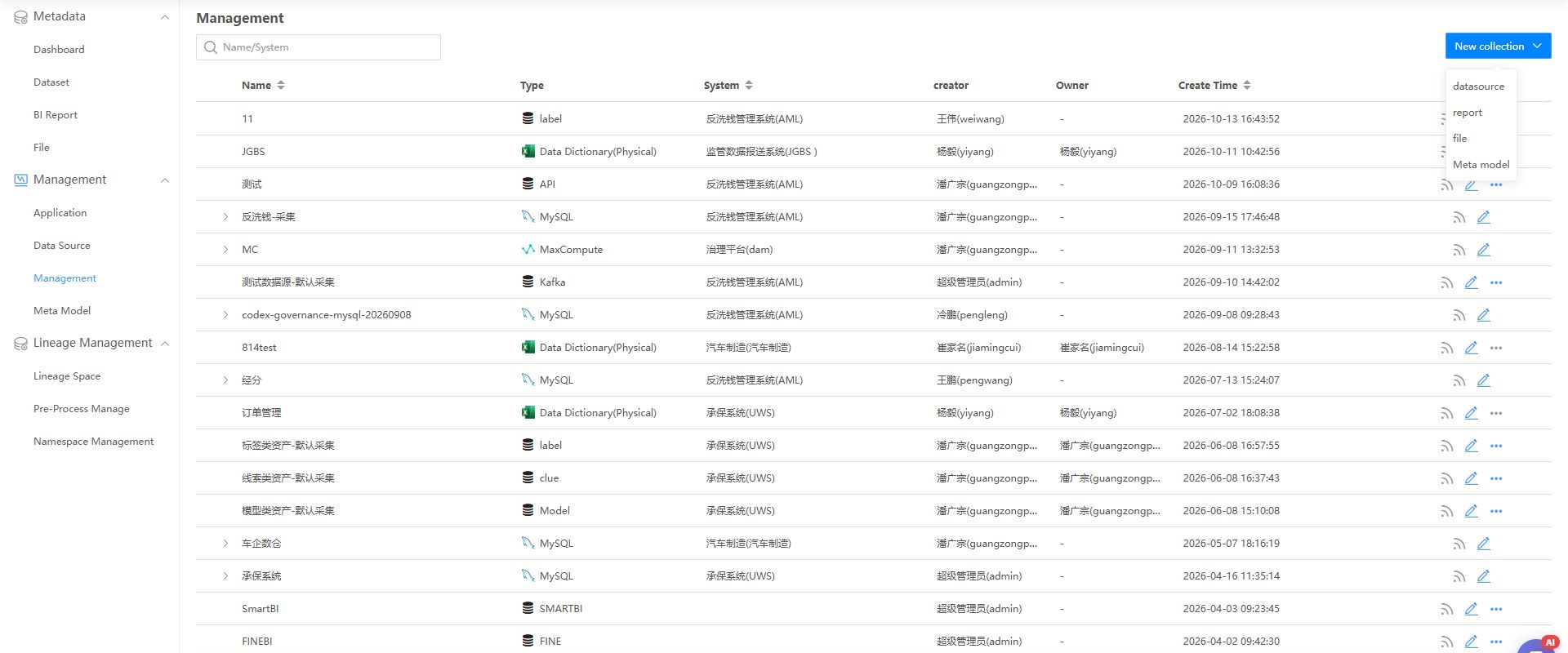
Names, users, and counts in the screenshot are examples from the verification environment.
Choose a harvesting path
Choose by the objects you want to manage, not simply by whether the input is a file.
| Source or target | Entry point | Prerequisites | Results |
|---|---|---|---|
| Relational database | Data Source | System, connection, driver, source and reverse engineering plugins, database and schema scope | Tables, columns, views, procedures, and functions in Datasets |
| HBase, MongoDB, or another database platform | Data Source | Matching connection, driver, and plugins; supported objects depend on the plugin | Technical objects in Datasets |
| Custom source | Data Source | Published metamodel, matching source and reverse engineering plugins, template or adapter | Metamodel objects and hierarchies in Datasets |
| FineBI, FineReport, SmartBI, or another supported BI tool | Report | Supported report type, service address, credentials, report folders | Reports, information items, and associated objects in Reports |
| Custom report | Create/import in DAM Reports, or import in SQLink Report Management | Report template, object codes, system, relationships | DAM Reports |
| DDM physical data dictionary | File > Data Dictionary (Physical) | DDM export with the correct template | Parsed tables and columns in Datasets |
| DDM logical data dictionary | File > Data Dictionary (Logical) | DDM export with the correct template | Parsed entities and attributes in Datasets |
| DDL file | File > Parse DDL | Matching dialect, namespace, and file | Parsed structural objects in Datasets |
| API metadata | File > API Metadata | Built-in REST API metamodel; JSON file or HTTP access settings | Services, endpoints, request/response parameters in Datasets |
| File assets on a server | File > File Storage Server | Access method, path, credentials, scope | Files for querying and downloading in Files |
| Other enterprise objects | Metamodel, or File > Metamodel File | Designed and published metamodel, template or plugin | Instances and relationships in Datasets |
A file can be a transport format or the asset itself. Dictionaries, DDL, API JSON, and metamodel templates create structured metadata. Only File Storage Server harvesting primarily creates entries in Files.
Check plugins
Plugins under System Management > Data Source Management determine selectable types, connections, and object recognition. Administrators should check them before configuration.
| Plugin | Purpose | Typical missing or incompatible behavior |
|---|---|---|
| Data source | Source types, connections, and integration | Missing source type or failed connection |
| Reverse engineering | Convert source structures to DAM objects | Connection works but objects are not recognized correctly |
| Lineage parser | Parse transformations from SQL, ETL, BI, and other files | Objects exist but lineage parsing fails or is incomplete |
Drivers do not replace plugins, and lineage parsers do not replace reverse engineering plugins. See Drivers and plugins for installation, replacement, and verification.
Prepare connections and accounts
Configure Application systems and data sources. Confirm database types, drivers, and plugins, then prepare a dedicated account using Source account permissions. Connection success proves login only. Test a few known objects to verify catalog, schema, and definition access.
Harvest data sources
Data Source covers relational, nonrelational, and custom metamodel sources. Installed plugins determine available types and objects.
- Go to Metadata Management > Harvesting Management and create a data source configuration.
- Enter its name and select a source using system and data source filters.
- Click Test, then continue after success.
- Select databases, schemas, and details; review connection, sampling, harvesting settings, and allowlists.
- Confirm to create models and default tasks for selected schemas.
- Configure task intervals and inspect execution history.
- In Datasets, verify the source and harvested tables, columns, procedures, functions, or metamodel objects.
Start with a few known objects, compare counts, names, types, lengths, and relationships with the source, then expand. This is implementation guidance, not a product limit.
| Setting | Check |
|---|---|
| Configuration name | Distinguishes source and purpose |
| System and source | Correct ownership and environment; test before scoping |
| Database and schema | Explicit intended scope rather than selecting all by default |
| Connection, sampling, harvesting | Structural access does not authorize business data access |
| Allowlist | Required tables are included; inspect logs for omissions |
| Interval | Verify the first result before scheduling updates and inspect actual triggers |
Harvest reports
For supported BI tools such as FineBI, FineReport, and SmartBI, create a Report configuration, select the tool, enter its service connection and folders, test, and confirm. Use the selected tool's own connection fields and authentication.
For custom reports without a supported connection, create or import them in DAM Reports, or import through SQLink Report Management. All appear in DAM Reports. Manual properties do not automatically create complete database lineage.
Use Report management to verify folders, properties, information items, and table relationships. A successful connection does not guarantee complete relationships.
Harvest file-based sources
Choose the subtype according to input and target objects.
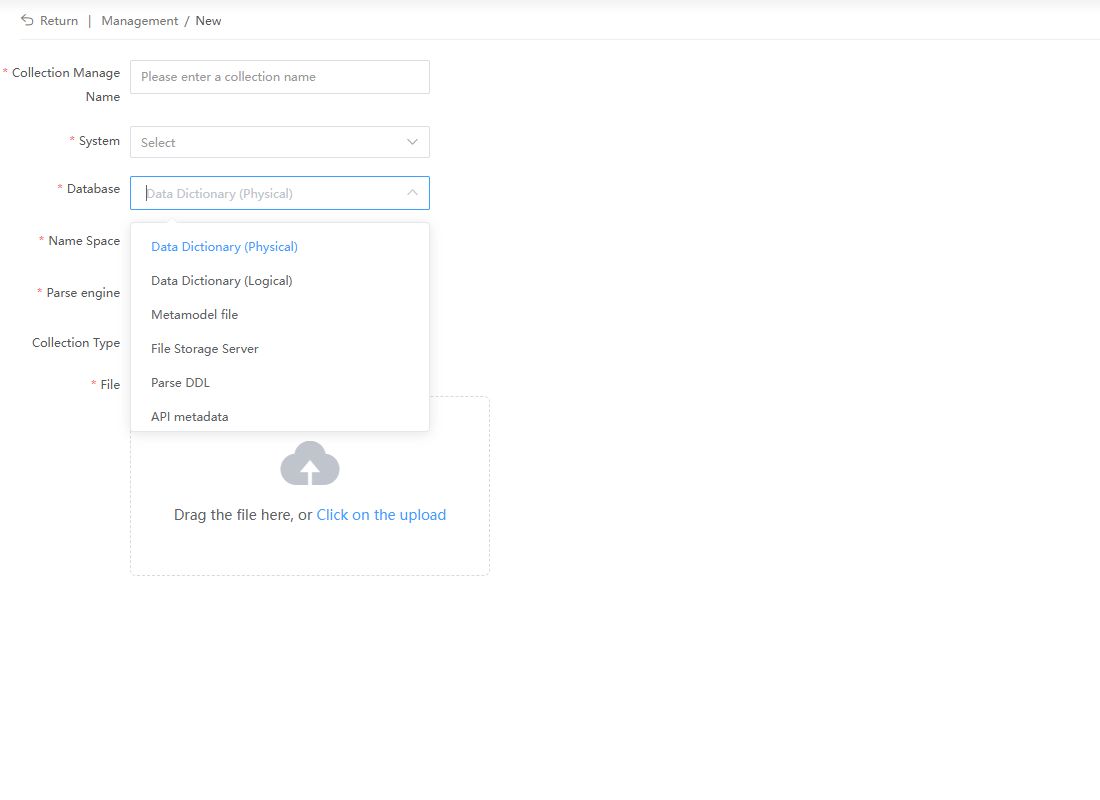
Physical and logical data dictionaries
Data Dictionary (Physical) and Data Dictionary (Logical) accept DDM exports for tables/columns and entities/attributes respectively. Preserve template columns, identifiers, and hierarchy. Query parsed objects in Datasets, not the original Excel file in Files.
DDL files
Select Parse DDL and the matching database or dialect. The parser extracts structures from table, view, procedure, and function definitions. This supports sources without direct database access, but reflects only the supplied script. Have its provider confirm completeness and consistency with production. Results appear in Datasets.
API metadata
Harvest JSON files or HTTP APIs through the REST API metamodel. Verify mappings for services, endpoints, and request/response parameters first. Results are metamodel objects in Datasets, not downloadable file entries.
File storage servers
Configure server access, path, and scope, then execute. Query, view, and download file objects in Files subject to permissions. This subtype maps directly to Files.
Harvest metamodel objects
A metamodel defines object types, properties, and relationships; harvesting supplies instances. Use it for APIs, queues, object storage, and enterprise-specific objects beyond built-in database models.
Complete design and publication in Metamodel concepts and Metamodel design. Choose a custom plugin, DAM template import, or File > Metamodel File according to the solution. Root, identifier, namespace, and template rules differ by path. See Custom metamodel harvesting and Metamodel import.
Run and verify results
- Check status and logs for the intended run.
- Query Datasets, Reports, or Files using the decision table.
- For source, dictionary, DDL, API, and metamodel inputs, verify source, object type, schema/namespace, and counts in Datasets.
- For reports, verify folders, reports, information items, and table relationships.
- For file servers, verify names, paths, sources, and download access.
- Compare sample tables, columns, and views with source attributes.
- Inspect missing objects, failures, and allowlist exclusions.
- Configure recurring Task scheduling after verification.
Troubleshoot common issues
| Symptom | Checks |
|---|---|
| Connection failure | Network, parameters, credentials, login rights, driver |
| Connection succeeds but no metadata | Task execution, catalogs, schema, allowlist, scope, logs |
| Fewer objects than expected | Account visibility, definitions, filters, failed objects |
| Reports lack tables | Source relationship information and database harvesting |
| Successful file input but no Files entry | Dictionaries, DDL, API, and metamodel results belong in Datasets |
| Missing database type | Compatible source and reverse engineering plugins and driver |
| Duplicate or incorrect hierarchy | Publication, identifiers, parent references, path-specific rules |
| Scheduled task does not run | Enablement, interval, time template intersection |